
CloudPass LogoCloud Pass
AWSGoogle CloudMicrosoftCiscoCompTIADatabricks
Certifications
AWSGoogle CloudMicrosoftCiscoCompTIADatabricks
Microsoft AZ-305
Microsoft AZ-305

Practice Test #2

Simulate the real exam experience with 50 questions and a 100-minute time limit. Practice with AI-verified answers and detailed explanations.

50Questions100Minutes700/1000Passing Score
Browse Practice Questions

AI-Powered

Triple AI-Verified Answers & Explanations

Every answer is cross-verified by 3 leading AI models to ensure maximum accuracy. Get detailed per-option explanations and in-depth question analysis.

GPT Pro
Claude Opus
Gemini Pro
Per-option explanations
In-depth question analysis
3-model consensus accuracy

Practice Questions

1
Question 1

HOTSPOT - You need to design a storage solution for an app that will store large amounts of frequently used data. The solution must meet the following requirements: ✑ Maximize data throughput. ✑ Prevent the modification of data for one year. ✑ Minimize latency for read and write operations. Which Azure Storage account type and storage service should you recommend? To answer, select the appropriate options in the answer area. NOTE: Each correct selection is worth one point. Hot Area:

Part 1:

Storage account type: ______

BlockBlobStorage is the correct account type because it is optimized for premium block blob workloads that require high throughput and low latency. Since the data must also be protected from modification for one year, Blob storage is needed to apply an immutability policy, and BlockBlobStorage is the premium account type aligned to that service. BlobStorage is a legacy account type, FileStorage is intended for Azure Files rather than blobs, and StorageV2 with Standard performance does not provide the same performance characteristics. Therefore, BlockBlobStorage best satisfies both the performance and immutability requirements.

Part 2:

Storage service: ______

Blob storage is the correct service because it supports immutable storage (WORM) through immutability policies, including time-based retention for a defined period such as one year. This directly satisfies the requirement to prevent modification of data for one year. Blob storage is also well-suited for storing large amounts of unstructured data and can deliver high throughput, especially when paired with Premium performance. Why others are wrong: - File (B): Azure Files is optimized for SMB/NFS file shares. While it can be very performant in Premium tiers, the exam-relevant, first-class immutability/WORM capability for “prevent modification for one year” is a Blob feature (immutability policies). - Table (C): Table storage is a NoSQL key/attribute store for structured data and is not intended for large unstructured datasets nor for WORM-style immutability requirements.

2
Question 2
(Select 2)

You have an Azure Active Directory (Azure AD) tenant that syncs with an on-premises Active Directory domain. You have an internal web app named WebApp1 that is hosted on-premises. WebApp1 uses Integrated Windows authentication. Some users work remotely and do NOT have VPN access to the on-premises network. You need to provide the remote users with single sign-on (SSO) access to WebApp1. Which two features should you include in the solution? Each correct answer presents part of the solution. NOTE: Each correct selection is worth one point.

Azure AD Application Proxy is correct because it is specifically built to provide remote access to on-premises web applications without requiring VPN connectivity. It uses an on-premises connector that makes outbound connections to Azure, so you do not need to expose the internal application directly to the internet. For apps using Integrated Windows authentication, Application Proxy supports single sign-on through Kerberos Constrained Delegation, allowing Azure AD-authenticated users to access the app seamlessly. This directly matches the requirement to give remote users SSO access to WebApp1.

Azure AD Privileged Identity Management (PIM) is wrong because it is used to manage privileged roles and provide just-in-time elevation for administrative access. It helps reduce standing privilege and supports approval workflows, notifications, and access reviews for privileged accounts. However, it does not publish on-premises applications, provide remote connectivity, or enable SSO for end users accessing an internal web app. Therefore, it does not address the core requirement in this scenario.

Conditional Access policies are wrong as a primary answer because they only control the conditions under which users can access applications, such as requiring MFA, compliant devices, or trusted locations. They do not provide the mechanism to expose an on-premises web application to remote users who lack VPN access. While Conditional Access can be layered on top of Application Proxy for additional security, it is not one of the required features to make the application reachable and provide SSO. The scenario asks for the core solution components, which are Application Proxy and the enterprise application configuration.

Azure Arc is wrong because it is intended for hybrid and multicloud resource management, such as managing servers, Kubernetes clusters, and data services from Azure. It extends Azure governance, policy, and management capabilities to non-Azure environments. It does not provide remote user access to on-premises web applications and has no role in Integrated Windows authentication SSO for this scenario. As a result, it is unrelated to the stated requirement.

Azure AD enterprise applications are correct because the published on-premises application is managed in Azure AD as an enterprise application. This is where administrators configure user and group assignment, SSO-related settings, and access behavior for the application. In an Application Proxy deployment, the app appears as an enterprise application in Azure AD, making this feature part of the overall solution. Without the enterprise application object, you would not have the Azure AD application integration layer needed to manage access to WebApp1.

Azure Application Gateway is wrong because it is primarily a Layer 7 load balancer for HTTP/HTTPS traffic with features such as SSL termination, path-based routing, and Web Application Firewall integration. Although it can publish web applications, it is not the Azure AD identity-based reverse proxy service designed for remote access to internal apps without VPN. It also does not natively provide the same Azure AD preauthentication and KCD-based SSO pattern used by Azure AD Application Proxy for Integrated Windows authentication apps. Compared to Application Proxy, it lacks the direct identity integration needed for this exact scenario.

Question Analysis

Core concept: This question tests how to provide remote users with secure single sign-on access to an on-premises web application that uses Integrated Windows authentication, when those users do not have VPN connectivity. The key Azure AD capability for this scenario is publishing the on-premises application externally through Azure AD while enabling authentication and access management through an enterprise application object. Why the answer is correct: Azure AD Application Proxy is designed specifically to publish on-premises web applications to external users without requiring inbound firewall ports or VPN access. It uses a connector installed on-premises that establishes outbound connections to Azure, allowing remote users to reach internal apps securely. For applications like WebApp1 that use Integrated Windows authentication, Application Proxy can be configured for Kerberos Constrained Delegation (KCD), which enables single sign-on from Azure AD to the on-premises app. Azure AD enterprise applications are also required because the published app is represented and managed in Azure AD as an enterprise application, where you configure user assignment, SSO settings, and access behavior. Key features / configurations: - Azure AD Application Proxy publishes internal web apps for external access without VPN. - Application Proxy connector is installed on-premises and communicates outbound to Azure. - Integrated Windows authentication apps can use Kerberos Constrained Delegation for SSO. - Azure AD enterprise applications provide the application object used for assignment, access control, and SSO configuration. - Users authenticate with Azure AD first, then Azure AD/Application Proxy brokers access to the internal app. Common misconceptions: - Conditional Access can control who can access an app, but it does not by itself publish an on-premises application or provide the connectivity path. - Privileged Identity Management is for just-in-time role activation and privileged access governance, not application publishing or user SSO to internal web apps. - Azure Application Gateway is a load balancer and web traffic management service, but it does not natively provide the Azure AD Application Proxy pattern for publishing internal Integrated Windows auth apps to remote users without VPN. - Azure Arc extends Azure management to hybrid resources, but it is unrelated to remote SSO access for an on-premises web application. Exam tips: - If the scenario says on-premises web app + remote users + no VPN, think Azure AD Application Proxy. - If the app uses Integrated Windows authentication, look for Kerberos Constrained Delegation support through Application Proxy. - Enterprise applications in Azure AD are commonly involved when configuring SSO, user assignment, and app access. - Conditional Access is often complementary, but not the core publishing solution. - Distinguish between identity/access services and network/load-balancing services.

3
Question 3

Note: This question is part of a series of questions that present the same scenario. Each question in the series contains a unique solution that might meet the stated goals. Some question sets might have more than one correct solution, while others might not have a correct solution. After you answer a question in this section, you will NOT be able to return to it. As a result, these questions will not appear in the review screen. You need to deploy resources to host a stateless web app in an Azure subscription. The solution must meet the following requirements: ✑ Provide access to the full .NET framework. Provide redundancy if an Azure region fails.

✑ Grant administrators access to the operating system to install custom application dependencies. Solution: You deploy two Azure virtual machines to two Azure regions, and you create an Azure Traffic Manager profile. Does this meet the goal?

Part 1:

By default, HTTPS traffic is allowed in NSG outbound security rules.

No. By default, an NSG’s outbound security rules include the built-in rule set: AllowVnetOutbound, AllowInternetOutbound, and DenyAllOutbound. While AllowInternetOutbound permits outbound traffic to the Internet, it is not an explicit “HTTPS allowed” rule; it allows all outbound protocols/ports to Internet (subject to other higher-priority rules). Also, many exam questions interpret “HTTPS traffic is allowed” as requiring an explicit rule for TCP/443. In practice, if you add a higher-priority deny rule or if the destination is not considered “Internet” (e.g., service tags, private endpoints), HTTPS may not be allowed. Therefore, it’s incorrect to state that HTTPS is allowed by default as a specific outbound rule; the default is broader (allow all outbound to Internet) and can be overridden.

Part 2:

VPN Gateway is required to connect Azure premises to on-premises.

No. A VPN Gateway is not strictly required to connect Azure to on-premises. You have multiple connectivity patterns: - Site-to-Site VPN uses an Azure VPN Gateway (required for that option). - ExpressRoute provides private connectivity via an ExpressRoute circuit and an ExpressRoute virtual network gateway (not a VPN gateway). - Point-to-Site VPN also uses a VPN gateway, but it’s for individual clients. Because the statement says “VPN Gateway is required” for any Azure-to-on-premises connectivity, it is false. In AZ-305, you should choose connectivity based on requirements: ExpressRoute for higher reliability/throughput and private peering, VPN for lower cost and quicker setup. Both can meet “connect to on-premises,” so VPN Gateway is not universally required.

Part 3:

Azure Load Balancer supports inbound and outbound scenarios.

Yes. Azure Load Balancer supports both inbound and outbound scenarios. For inbound, it distributes incoming TCP/UDP traffic to backend instances (VMs/VMSS) using load-balancing rules and health probes, and it can provide inbound NAT rules for port forwarding to specific instances. For outbound, Standard Load Balancer supports outbound connectivity via outbound rules (and historically via implicit SNAT behavior), allowing instances without public IPs to initiate connections to the Internet through the load balancer’s frontend. This is a common AZ-305 point: Standard Load Balancer is a Layer 4 service (not HTTP-aware like Application Gateway) and can be used to manage both inbound distribution and controlled outbound SNAT at scale.

4
Question 4

You have an Azure subscription that contains a Basic Azure virtual WAN named VirtualWAN1 and the virtual hubs shown in the following table.
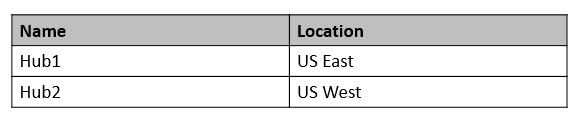
diagram

You have an ExpressRoute circuit in the US East Azure region. You need to create an ExpressRoute association to VirtualWAN1. What should you do first?

Incorrect. Although Virtual WAN feature support is an important consideration, upgrading the WAN SKU is not the direct first action asked for in the association workflow. The practical prerequisite for associating the ExpressRoute circuit is the presence of an ExpressRoute gateway in the target hub. In this scenario, the needed operational step is to create the gateway on Hub1.

Correct. An ExpressRoute circuit is associated to Azure Virtual WAN through an ExpressRoute gateway deployed in a virtual hub. Since the circuit is in the US East region, Hub1 is the appropriate hub for the connection. Without creating the gateway on Hub1, there is no hub-side resource available to complete the ExpressRoute association.

Incorrect. ExpressRoute Premium is an optional add-on that extends route limits and connectivity scope for the circuit. It does not deploy an ExpressRoute gateway in a virtual hub and does not by itself enable the association to VirtualWAN1. Therefore, it is not the first step required here.

Incorrect. Azure Virtual WAN uses managed virtual hubs, not customer-created hub virtual networks, for ExpressRoute connectivity. The environment already contains Hub1 and Hub2 as virtual hubs, and Hub1 is in the correct region. Creating a separate hub virtual network would not help establish the ExpressRoute association.

Question Analysis

Core concept: This question tests the prerequisites for associating an ExpressRoute circuit with an Azure Virtual WAN virtual hub. An ExpressRoute circuit is associated to a virtual hub through an ExpressRoute gateway deployed in that hub, and the hub must be in the appropriate region for the circuit. Why correct: Because the ExpressRoute circuit is in US East and Hub1 is also in US East, the required first action is to create an ExpressRoute gateway on Hub1. The association cannot be created until the hub has the gateway resource that terminates the ExpressRoute connectivity. Key features: - ExpressRoute associations in Virtual WAN are made to a virtual hub through an ExpressRoute gateway. - Regional alignment matters; the circuit is in US East, so Hub1 is the correct hub. - Virtual WAN hubs are Microsoft-managed constructs, so you do not create a separate hub VNet for this scenario. Common misconceptions: - Upgrading features or enabling add-ons is not itself the association step; the operational prerequisite is the gateway in the hub. - ExpressRoute Premium expands circuit capabilities, but it does not create the hub-side gateway needed for association. - A hub virtual network is part of traditional hub-and-spoke design, not Azure Virtual WAN managed hub architecture. Exam tips: When a question asks what to do first to connect ExpressRoute to Virtual WAN, look for the option that deploys the ExpressRoute gateway in the correct virtual hub and region. Distinguish between Virtual WAN hubs and regular VNets, and remember that circuit add-ons do not replace hub gateway deployment.

5
Question 5

You have an Azure subscription that contains two applications named App1 and App2. App1 is a sales processing application. When a transaction in App1 requires shipping, a message is added to an Azure Storage account queue, and then App2 listens to the queue for relevant transactions. In the future, additional applications will be added that will process some of the shipping requests based on the specific details of the transactions. You need to recommend a replacement for the storage account queue to ensure that each additional application will be able to read the relevant transactions. What should you recommend?

Azure Data Factory is an ETL/ELT and data integration service, not a real-time messaging broker. While ADF can orchestrate movement and transformation of data, it is not designed for low-latency event distribution to multiple applications, nor does it provide pub-sub semantics, message locks, dead-letter queues, or subscription filtering for transactional processing.

Multiple storage account queues could work only if App1 (or an intermediary) duplicates each message into the correct queue(s). That creates tight coupling and requires custom fan-out and routing logic, increasing complexity and operational risk. Storage queues also lack advanced features like subscription filters, dead-lettering, sessions, and richer delivery guarantees compared to Service Bus.

One Azure Service Bus queue is a point-to-point pattern with competing consumers. If App2 and future apps all read from the same queue, each message is consumed by only one receiver, not all relevant receivers. You could add custom logic to forward messages, but that reintroduces complexity and does not meet the requirement that each additional application can read relevant transactions.

One Azure Service Bus topic provides publish/subscribe messaging. App1 publishes shipping requests to the topic, and each processing application creates its own subscription. Subscriptions can use SQL/correlation filters to receive only relevant transactions based on message properties. Each subscription gets its own copy of messages, enabling multiple applications to process the same request independently with enterprise messaging features.

Question Analysis

Core concept: This question tests messaging patterns for decoupled applications, specifically the difference between point-to-point queues and publish/subscribe (pub-sub) using Azure Service Bus. Azure Storage queues are simple and cost-effective but limited in advanced routing and multi-consumer patterns. Why the answer is correct: You need a replacement that allows multiple future applications to read only the transactions relevant to them. A single Azure Service Bus topic enables pub-sub: App1 publishes each shipping request as a message to the topic, and each downstream application creates its own subscription. Each subscription receives its own copy of the message stream, so multiple apps can process the same shipping request independently without competing consumers removing messages from a single queue. Key features and best practices: Service Bus topics support subscriptions with SQL filters and correlation filters, allowing routing based on transaction details (e.g., region, shipping method, priority, customer tier). This matches the requirement that additional applications will process “some” requests based on specific details. Topics also provide enterprise messaging capabilities such as dead-lettering, duplicate detection, sessions (ordering/grouping), scheduled delivery, and at-least-once delivery semantics. From an Azure Well-Architected Framework perspective, topics improve reliability (DLQ, retries), operational excellence (clear separation via subscriptions), and performance efficiency (filtering reduces unnecessary processing). Common misconceptions: A Service Bus queue (single queue) still uses competing consumers—only one receiver gets a given message—so it does not naturally enable multiple applications to each read the same transaction. Multiple storage queues could be used by duplicating messages, but that pushes fan-out and routing logic into App1 (or another component), increasing coupling and complexity. Exam tips: If the requirement implies “multiple independent consumers should each get a copy,” think Service Bus topic. If it implies “only one consumer should process each message,” think queue. If routing by message properties is mentioned, topics + subscriptions + filters is the canonical Azure design.

Want to practice all questions on the go?

Download Cloud Pass — includes practice tests, progress tracking & more.

6
Question 6

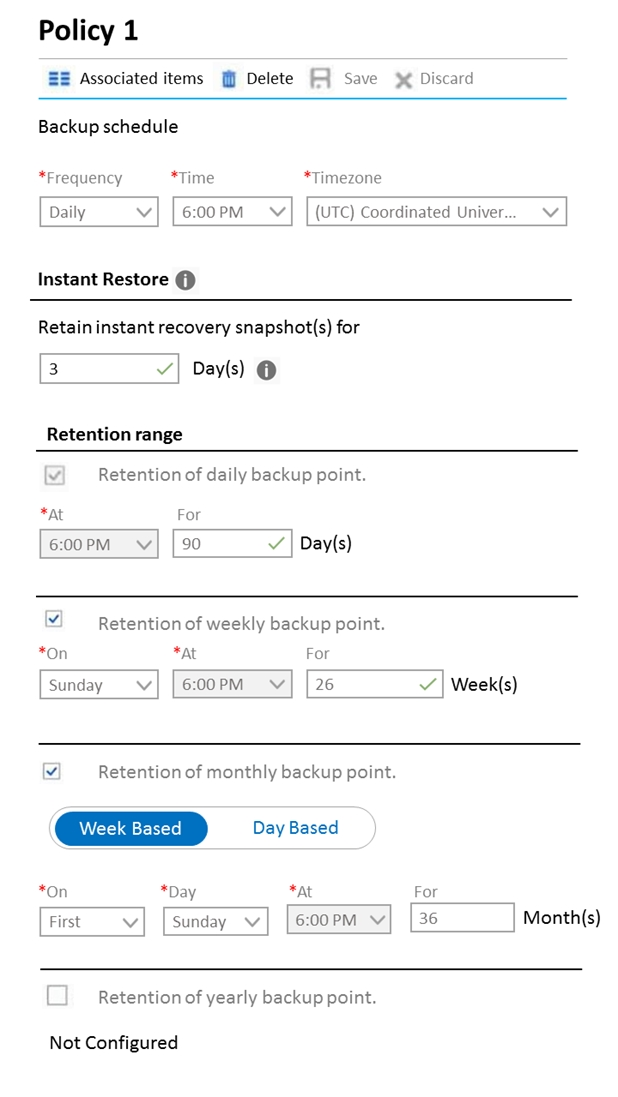
HOTSPOT - You plan to deploy the backup policy shown in the following exhibit.

Use the drop-down menus to select the answer choice that completes each statement based on the information presented in the graphic. NOTE: Each correct selection is worth one point. Hot Area:
Part 1:

Select the correct answer(s) in the image below.

question-image

Sub-question 2008 does not contain an answerable certification item. The provided options ('Pass'/'Fail') are unrelated to the Azure Backup policy shown in the exhibit and do not correspond to any valid hotspot selection. Because the actual hotspot prompt is missing and the image only shows the backup policy configuration, there is not enough context to determine a correct answer for this sub-question.

Part 2:

Virtual machines that are backed up by using the policy can be recovered for up to a maximum of ______:

Maximum recovery window is determined by the longest retention period among the enabled retention ranges, not by summing daily + weekly + monthly. From the policy: - Daily recovery points retained for 90 days. - Weekly recovery points retained for 26 weeks. - Monthly recovery points retained for 36 months. - Yearly retention is not configured. Because monthly retention is enabled for 36 months, you can recover to a recovery point as old as 36 months (subject to having a monthly recovery point for that period). The 90-day and 26-week settings provide additional restore points for more recent time ranges but do not extend the maximum beyond the longest tier. Why others are wrong: - 90 days and 26 weeks are shorter than 36 months. - 45 months is not configured anywhere; you cannot add 36 months + 26 weeks + 90 days because these retentions overlap and represent different granularity tiers, not cumulative time.

Part 3:

The minimum recovery point objective (RPO) for virtual machines that are backed up by using the policy is ______:

Recovery Point Objective (RPO) is the maximum acceptable data loss measured in time, and for Azure VM backups it is primarily driven by how often backups are taken (the backup schedule frequency). The policy shows: - Frequency: Daily - Time: 6:00 PM (UTC) That means Azure Backup creates one scheduled recovery point per day. Therefore, the minimum (best-case) RPO you can achieve with this policy is 1 day, because in the worst case you could lose up to nearly 24 hours of changes between backups. Why others are wrong: - 1 hour is not achievable with a daily schedule (it would require more frequent backups). - 1 week, 1 month, and 1 year are retention/granularity concepts, not the backup frequency here. Weekly/monthly retention controls how long certain recovery points are kept, not how often they are created. - Instant Restore (3 days) affects restore speed/location, not backup frequency, so it does not reduce RPO below daily.

7
Question 7

You have SQL Server on an Azure virtual machine. The databases are written to nightly as part of a batch process. You need to recommend a disaster recovery solution for the data. The solution must meet the following requirements: ✑ Provide the ability to recover in the event of a regional outage. ✑ Support a recovery time objective (RTO) of 15 minutes. ✑ Support a recovery point objective (RPO) of 24 hours. ✑ Support automated recovery. ✑ Minimize costs. What should you include in the recommendation?

Azure virtual machine availability sets protect against host and rack failures within a single Azure region by spreading VMs across fault and update domains. They do not provide cross-region replication or recovery during a regional outage. Therefore, they cannot satisfy the requirement to recover from a regional outage, nor do they provide automated DR failover to another region.

Azure Disk Backup (or Azure Backup for disks/VMs) provides point-in-time restore capability and can support cross-region restore options, but it is primarily a backup/restore solution, not an automated DR failover solution. Meeting a 15-minute RTO is unlikely because restoring disks/VMs and reconfiguring networking/app dependencies typically takes longer and is not an orchestrated automated failover like ASR.

An Always On availability group can provide cross-region DR with low RPO/RTO and automatic failover (with appropriate configuration, quorum/witness, and synchronous/asynchronous replicas). However, it generally requires a secondary SQL Server VM running in the other region (plus licensing/compute/storage), increasing cost. Given the relaxed RPO (24 hours) and the need to minimize costs, this is usually overkill compared to ASR.

Azure Site Recovery replicates Azure VMs to a secondary region and orchestrates automated failover/failback using Recovery Plans. It is designed for regional outage scenarios and can meet a 15-minute RTO for many VM workloads with proper planning and testing. It also minimizes cost because the secondary region does not require continuously running SQL compute; you mainly pay for replication and storage until failover.

Question Analysis

Core concept: This question tests disaster recovery (DR) design for a SQL Server workload running on an Azure VM, focusing on regional resiliency, RTO/RPO targets, automation, and cost optimization. For VM-based workloads, Azure Site Recovery (ASR) is Azure’s primary DR orchestration service. Why the answer is correct: Azure Site Recovery replicates an Azure VM (including OS and data disks) to a secondary Azure region and provides automated failover/failback orchestration. This directly addresses “recover in the event of a regional outage” and “support automated recovery.” An RTO of 15 minutes is achievable for many VM workloads with ASR because failover is an orchestrated operation (boot replicated VM, apply networking, run recovery plans). The RPO requirement is 24 hours, which is relatively relaxed; ASR typically supports much lower RPOs (often minutes) depending on churn and replication settings, so meeting 24 hours is not a constraint. Cost is minimized versus database-level HA/DR solutions because ASR avoids running a full-time secondary SQL Server instance; you pay for ASR plus storage/replication, and compute in the target region is primarily incurred during testing or actual failover. Key features / configuration notes: - Enable ASR replication for the SQL VM to a paired/secondary region; choose appropriate replication policy and target storage. - Use Recovery Plans to automate sequencing (e.g., domain controllers/app tiers before SQL) and run scripts for post-failover tasks. - Validate RTO with regular DR drills (test failovers) and ensure dependencies (DNS, connection strings, networking) are included. - Align with Azure Well-Architected Framework (Reliability): design for regional failure, automate recovery, and regularly test. Common misconceptions: - Availability sets improve availability within a region, not regional DR. - Disk Backup/VM backup provides restore capability but not fast, automated regional failover with a 15-minute RTO. - Always On availability groups can meet RTO/RPO but typically require running and licensing a secondary SQL instance (higher cost) and more complex configuration. Exam tips: When requirements include “regional outage” + “automated recovery” + VM-based workload, ASR is usually the best fit. Use SQL Always On for database-level HA/DR when you need near-zero RPO and very low RTO with active secondary replicas, but expect higher cost and operational complexity.

8
Question 8

HOTSPOT - You are designing an Azure App Service web app. You plan to deploy the web app to the North Europe Azure region and the West Europe Azure region. You need to recommend a solution for the web app. The solution must meet the following requirements: ✑ Users must always access the web app from the North Europe region, unless the region fails. ✑ The web app must be available to users if an Azure region is unavailable. ✑ Deployment costs must be minimized. What should you include in the recommendation? To answer, select the appropriate options in the answer area. NOTE: Each correct selection is worth one point. Hot Area:

Part 1:

Request routing method: ______

Correct: A Traffic Manager profile. Azure Traffic Manager provides global DNS-based routing across endpoints (such as two App Service apps in North Europe and West Europe). It continuously probes endpoint health and can direct users to the primary region, failing over automatically if the primary becomes unavailable. This directly satisfies the requirement that users always access North Europe unless that region fails, and it provides regional availability. Why not Azure Application Gateway (B): Application Gateway is a regional Layer 7 load balancer. To cover two regions, you would typically deploy one per region and then still need a global routing mechanism (often Traffic Manager or Front Door) to choose between regions. That adds cost and complexity beyond what is required. Why not Azure Load Balancer (C): Azure Load Balancer is regional Layer 4 and cannot provide cross-region DNS-based failover for App Service endpoints. It’s not the right tool for global/regional failover routing.

Part 2:

Request routing configuration: ______

Correct: Priority traffic routing. Priority routing in Traffic Manager is specifically intended for active/passive designs. You configure the North Europe endpoint with the highest priority (lowest priority number) and the West Europe endpoint as the next priority. Traffic Manager sends all users to North Europe as long as it is healthy, and only routes to West Europe when North Europe fails health probes. Why not Performance routing (B): Performance routing chooses the endpoint with the lowest network latency for each user, which could send some users to West Europe even when North Europe is healthy—violating the requirement. Why not Weighted routing (D): Weighted routing distributes traffic across endpoints based on weights (active/active), which would also send some traffic to West Europe during normal operations. Why not Cookie-based session affinity (A): That is an Application Gateway feature for sticky sessions, not a Traffic Manager routing method, and it doesn’t address regional failover preference.

9
Question 9

You have an Azure subscription that contains a storage account. An application sometimes writes duplicate files to the storage account. You have a PowerShell script that identifies and deletes duplicate files in the storage account. Currently, the script is run manually after approval from the operations manager. You need to recommend a serverless solution that performs the following actions: ✑ Runs the script once an hour to identify whether duplicate files exist ✑ Sends an email notification to the operations manager requesting approval to delete the duplicate files ✑ Processes an email response from the operations manager specifying whether the deletion was approved ✑ Runs the script if the deletion was approved What should you include in the recommendation?

Azure Logic Apps can handle scheduling and email/approval workflows, but Event Grid is primarily for event routing (pub/sub) and does not run PowerShell scripts. You would still need a compute service (like Azure Functions) to execute the deletion logic. Event Grid also doesn’t provide a native “wait for approval response” capability; that’s a Logic Apps workflow feature.

Logic Apps provides the hourly Recurrence trigger, sends an approval email, and can wait for and process the approval response using built-in approval actions/connectors. Azure Functions provides the serverless compute to run the PowerShell-based duplicate detection/deletion logic (often via an HTTP-triggered function called from Logic Apps). This is the most direct serverless pattern for “workflow + custom script execution.”

Azure Pipelines is intended for CI/CD automation, not for hourly operational workflows with human email approvals and runtime orchestration. Service Fabric is a microservices platform requiring cluster management and is not serverless. This option violates the requirement for a serverless solution and adds unnecessary operational overhead and complexity.

Azure Functions can run code, and Azure Batch is for large-scale parallel/batch compute jobs, not for orchestrating human approvals via email. You would still need a workflow engine (like Logic Apps) to send approval requests and wait for responses. Batch is also not typically considered serverless in the same way and is overkill for an hourly duplicate-file cleanup task.

Question Analysis

Core concept: This scenario tests choosing a serverless orchestration and automation approach that includes scheduling, human approval, email interaction, and conditional execution of a PowerShell-based cleanup process. In Azure, the most common pattern is to use Azure Logic Apps for workflow/orchestration (including approvals and email connectors) and Azure Functions for running custom code/scripts. Why the answer is correct: Azure Logic Apps can run on a schedule (Recurrence trigger) once per hour, send an approval request to the operations manager (built-in Approvals connector or Outlook/SMTP connectors), and then wait for and process the response ("Start and wait for an approval" action). Based on the approval outcome, Logic Apps can conditionally invoke an Azure Function (HTTP action) to execute the duplicate-file deletion logic. Azure Functions is the serverless compute component suited to run custom PowerShell (PowerShell-based Function) or to wrap the existing script with minimal refactoring. This combination cleanly separates workflow (Logic Apps) from compute (Functions), aligning with Azure Well-Architected Framework principles: operational excellence (repeatable automation), reliability (managed services with retries), and cost optimization (consumption-based serverless). Key features and configuration notes: - Logic Apps: Recurrence trigger (hourly), email/Approvals connector, conditional branching, built-in retry policies, and run history for auditing. - Human-in-the-loop: Approvals action provides a durable wait state without you managing state. - Azure Functions: PowerShell runtime support, managed identity to access the storage account securely (avoid secrets), and integration via HTTP trigger. - Storage access: Use RBAC (e.g., Storage Blob Data Contributor) for the Function’s managed identity. Common misconceptions: Event Grid is event-driven and not designed for “wait for human email approval” patterns by itself; it also doesn’t execute scripts. Azure Pipelines/Service Fabric and Functions/Batch are heavier-weight and not focused on email approvals and workflow orchestration. Exam tips: When you see “schedule + approval email + wait for response + conditional execution,” think Logic Apps for orchestration. When you see “run script/code serverlessly,” think Azure Functions. Pair them for end-to-end serverless automation with human approval gates.

10
Question 10

HOTSPOT - Your company has 20 web APIs that were developed in-house. The company is developing 10 web apps that will use the web APIs. The web apps and the APIs are registered in the company s Azure Active Directory (Azure AD) tenant. The web APIs are published by using Azure API Management. You need to recommend a solution to block unauthorized requests originating from the web apps from reaching the web APIs. The solution must meet the following requirements: ✑ Use Azure AD-generated claims. Minimize configuration and management effort.

What should you include in the recommendation? To answer, select the appropriate options in the answer area. NOTE: Each correct selection is worth one point. Hot Area:

Part 1:

Select the correct answer(s) in the image below.

question-image

Pass is appropriate because the correct design is a common AZ-305 identity + API protection pattern: authorize in Azure AD and enforce at API Management using JWT validation. The requirement explicitly says to use Azure AD-generated claims and minimize configuration/management. That points away from implementing authorization inside each of the 20 APIs (higher effort) and toward centralized enforcement in APIM policies. So the solution is: configure Azure AD permissions (scopes/app roles) for the web apps to call the APIs, and configure APIM to validate JWTs and required claims. This blocks unauthorized requests at the gateway, before they reach the APIs.

Part 2:

Grant permissions to allow the web apps to access the web APIs by using: ______

Granting permissions for web apps to access web APIs is done in Azure AD (Microsoft Entra ID) via app registrations. You either: - Expose an API (define OAuth2 scopes) on the API app registration and grant the web app delegated/application permissions, or - Define app roles on the API and assign them to the calling web app/service principal. This is the authoritative place where consent and permission grants are managed and where Azure AD will issue tokens containing the relevant claims (e.g., scp for scopes, roles for app roles). Why not APIM? APIM can enforce tokens but it does not define or grant Azure AD permissions; it integrates with Azure AD. Why not “the web APIs”? Implementing permissions directly in each API would increase management effort and would not be the central permission grant mechanism for Azure AD-issued tokens.

Part 3:

Configure a JSON Web Token (JWT) validation policy by using: ______

Configure JWT validation in Azure API Management. APIM provides the built-in validate-jwt policy to validate: - Token signature (using Azure AD OpenID metadata) - Issuer (iss) - Audience (aud) - Token lifetime - Required claims such as scopes (scp) or roles (roles) This directly satisfies “block unauthorized requests … from reaching the web APIs” because APIM rejects invalid/unauthorized calls at the gateway layer. Why not Azure AD? Azure AD issues tokens and defines permissions, but it doesn’t sit inline to validate every API request; the resource server/gateway must validate the JWT. Why not “the web APIs”? You could validate JWTs in each API, but that increases configuration and ongoing management across 20 APIs, violating the requirement to minimize effort. Centralizing in APIM is the intended design.

Other Practice Tests

Practice Test #1

50 Questions·100 min·Pass 700/1000

Practice Test #3

50 Questions·100 min·Pass 700/1000

Practice Test #4

50 Questions·100 min·Pass 700/1000
← View All Microsoft AZ-305 Questions

Start Practicing Now

Download Cloud Pass and start practicing all Microsoft AZ-305 exam questions.

Get it on Google PlayDownload on the App Store
Cloud PassCloud Pass

IT Certification Practice App

Get it on Google PlayDownload on the App Store

Certifications

AWSGCPMicrosoftCiscoCompTIADatabricks

Legal

FAQPrivacy PolicyTerms of Service

Company

ContactDelete Account

© Copyright 2026 Cloud Pass, All rights reserved.

Want to practice all questions on the go?

Get the app

Download Cloud Pass — includes practice tests, progress tracking & more.