
CloudPass LogoCloud Pass
AWSGoogle CloudMicrosoftCiscoCompTIADatabricks
Certifications
AWSGoogle CloudMicrosoftCiscoCompTIADatabricks
Google Professional Cloud Developer

Practice Test #4

Simulate the real exam experience with 50 questions and a 120-minute time limit. Practice with AI-verified answers and detailed explanations.

50Questions120Minutes700/1000Passing Score
Browse Practice Questions

AI-Powered

Triple AI-Verified Answers & Explanations

Every answer is cross-verified by 3 leading AI models to ensure maximum accuracy. Get detailed per-option explanations and in-depth question analysis.

GPT Pro
Claude Opus
Gemini Pro
Per-option explanations
In-depth question analysis
3-model consensus accuracy

Practice Questions

1
Question 1

Your retail analytics team has an IoT gateway that uploads a 5 MB CSV summary every 10 minutes to a Cloud Storage bucket gs://retail-iot-summaries-prod. Upon each successful upload, you must notify a downstream pipeline via the Pub/Sub topic projects/acme/topics/iot-summaries so a Dataflow job can start. You want a solution that requires the least development and operational effort, introduces no additional compute to manage, and can be set up within 1 hour; what should you do?

Correct. Cloud Storage can be configured to publish object finalize (OBJECT_FINALIZE) notifications directly to a Pub/Sub topic. This is a native integration requiring no code and no compute to manage, aligning with minimal operational effort and rapid setup. Ensure IAM allows the Cloud Storage service account to publish to the topic and design downstream consumers for at-least-once delivery semantics.

Incorrect. App Engine would require building and deploying an application endpoint to receive uploads and then publish to Pub/Sub. This adds development time, operational considerations (versions, scaling behavior, monitoring), and changes the ingestion path (gateway uploads to the app rather than directly to Cloud Storage). It violates the requirement for least development and no additional compute to manage.

Incorrect for this question’s constraints. A Cloud Function triggered by Cloud Storage finalize events can publish to Pub/Sub, but it still requires writing, deploying, and operating code (runtime configuration, retries, logging/alerting, IAM for the function). Since Cloud Storage can publish directly to Pub/Sub, the function is unnecessary extra moving parts for a simple notification.

Incorrect. Running a service on GKE introduces the highest operational overhead: cluster provisioning, node management (or even with Autopilot, still more setup), deployments, scaling, security patching, and monitoring. It also requires changing the upload flow to hit the service. This is far from the “within 1 hour” and “no additional compute to manage” requirement.

Question Analysis

Core Concept: This question tests event-driven integration between Cloud Storage and Pub/Sub with minimal operational overhead. The key capability is Cloud Storage event notifications (object finalize) that can publish directly to a Pub/Sub topic, enabling downstream systems (like Dataflow) to react to new objects without running any intermediary compute. Why the Answer is Correct: Configuring the bucket to send OBJECT_FINALIZE notifications to Pub/Sub is the lowest-development, lowest-ops approach. It requires no code, no runtime to deploy, and no scaling/patching/monitoring of compute. It can be configured quickly (often within minutes) and meets the requirement “upon each successful upload” because finalize events occur when an object is successfully created/overwritten in the bucket. Key Features / Configuration / Best Practices: - Use Cloud Storage Pub/Sub notifications for OBJECT_FINALIZE on gs://retail-iot-summaries-prod. - Ensure the Pub/Sub topic exists in the correct project (projects/acme/topics/iot-summaries) and grant the Cloud Storage service account permission to publish (pubsub.publisher) on the topic. - Consider filtering/handling duplicates downstream: storage notifications are at-least-once delivery, so Dataflow triggering logic should be idempotent (e.g., dedupe by object name + generation). - Include object metadata in the notification (bucket, objectId, generation) to let Dataflow locate the exact file. Common Misconceptions: Cloud Functions (option C) is also serverless, but it introduces code, deployment, IAM for function runtime, retries, and potential cold-start/observability overhead. App Engine and GKE add even more operational burden and are unnecessary because Cloud Storage can already emit Pub/Sub events directly. Exam Tips: When requirements emphasize “least development,” “no additional compute,” and “set up quickly,” prefer managed integrations (native event notifications) over writing glue code. Remember Cloud Storage → Pub/Sub notifications are a classic integration pattern; reserve Cloud Functions for cases needing transformation, validation, routing, or enrichment before publishing.

2
Question 2

Your startup manages 3,000 smart vending machines that publish 4 KB JSON telemetry to a Pub/Sub topic at an average rate of 600 messages per second (peaks up to 1,200). You must parse each message and persist it for analytics with end-to-end latency under 45 seconds, and each message must be processed exactly once to avoid double-counting transactions. You want the cheapest and simplest fully managed approach with minimal operations overhead and cannot maintain clusters or build custom deduplication workflows. What should you do?

Recurring Dataproc jobs are batch-oriented and typically won’t meet a strict <45-second end-to-end latency SLA unless run extremely frequently, which increases cost and complexity. Dataproc also implies cluster management (even if ephemeral), conflicting with “cannot maintain clusters.” Pulling from Pub/Sub in batch can also complicate offset management and exactly-once guarantees without additional state handling.

Dataflow streaming is fully managed, autoscaling, and designed for Pub/Sub ingestion with low latency. Apache Beam’s PubsubIO integrates cleanly, and Dataflow provides fault tolerance via checkpointing so messages are not double-counted within the pipeline. Windowed writes to Cloud Storage support efficient downstream analytics workflows while keeping operations overhead low and meeting the 45-second latency requirement.

Pub/Sub-triggered Cloud Functions provide at-least-once delivery, so duplicates can occur during retries, timeouts, or transient errors. Writing directly to BigQuery from Functions can therefore double-count unless you implement idempotency or deduplication. The option explicitly relies on a daily dedup query, which violates the “exactly once” requirement and also fails the <45-second end-to-end correctness requirement for analytics.

This design adds unnecessary complexity and operational overhead: writing to Bigtable and then running a second streaming pipeline to remove duplicates is explicitly a custom deduplication workflow, which the prompt disallows. It also increases cost (Bigtable instance + two pipelines) and introduces more failure modes and latency. Dataflow can handle exactly-once processing without this two-step approach.

Question Analysis

Core concept: This question tests selecting a fully managed streaming ingestion and processing architecture that meets low-latency SLAs and exactly-once processing semantics. The key services are Pub/Sub for ingestion and Dataflow (Apache Beam) for managed stream processing, with an analytics sink. Why the answer is correct: A Dataflow streaming pipeline reading from Pub/Sub and writing windowed outputs to Cloud Storage is the simplest fully managed option among the choices that can meet the <45s end-to-end latency requirement while providing exactly-once processing guarantees within the pipeline. Dataflow provides checkpointing, autoscaling, and fault-tolerant processing. With Pub/Sub as the source, Dataflow can ensure each message is processed once by the pipeline (no custom dedup workflow required) and can emit deterministic windowed files to Cloud Storage for downstream analytics (for example, batch loads to BigQuery or processing via Dataproc Serverless/BigQuery external tables). Key features / configurations / best practices: - Use Dataflow streaming with Pub/Sub source and enable streaming engine for efficiency. - Use event-time processing with fixed windows (e.g., 1-minute) and allowed lateness appropriate to device clock skew. - Write to Cloud Storage using windowed writes (e.g., file-per-window with sharding) to keep file sizes reasonable and avoid small-file problems. - Size for peaks: 1,200 msg/s * 4 KB ≈ 4.8 MB/s, which is well within Pub/Sub and Dataflow throughput; Dataflow autoscaling handles bursts. - Exactly-once: Dataflow’s checkpointing and replay handling avoids double-processing in the pipeline; avoid non-idempotent side effects unless the sink supports idempotency. Common misconceptions: - “Cloud Functions is simpler”: it is operationally simple, but exactly-once is not guaranteed with Pub/Sub-triggered functions (at-least-once delivery), so you must deduplicate, which the prompt forbids. - “Dataproc job is cheaper”: recurring batch jobs increase latency and require cluster operations (or at least job orchestration) and don’t naturally meet a 45-second streaming SLA. - “Use Bigtable then dedupe”: introduces extra pipelines and custom dedup logic, violating the requirement for minimal operations and no custom dedup workflows. Exam tips: - For Pub/Sub streaming with low latency and minimal ops, default to Dataflow. - If the requirement says “exactly once” and forbids custom dedup, avoid Cloud Functions/Cloud Run consumers unless the sink is inherently idempotent and the design explicitly uses unique keys. - Map requirements to the Google Cloud Architecture Framework: operational excellence (managed services), reliability (checkpointing/retries), performance (autoscaling), and cost (avoid always-on clusters).

3
Question 3

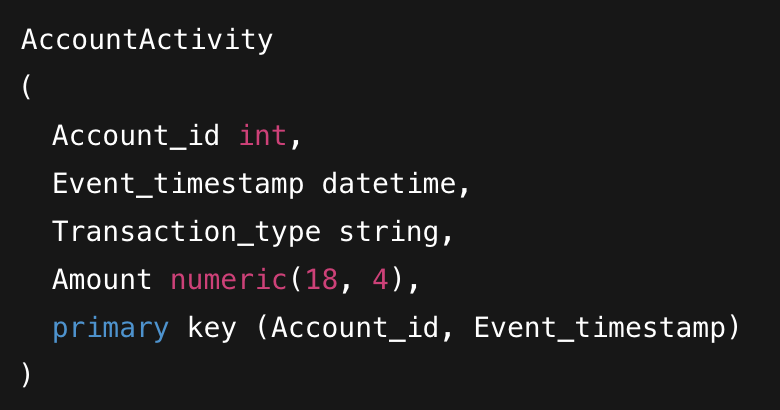
You are migrating a MySQL table named AccountActivity to Cloud Bigtable. The table schema includes Account_id, Event_timestamp, Transaction_type, and Amount, with a primary key defined as (Account_id, Event_timestamp). To ensure efficient data modeling and query performance in Bigtable, how should you design the row key?
Using Account_id alone groups data by account, but it does not provide uniqueness for multiple events per account. In Bigtable, each row key identifies a single row; repeated writes to the same row key would overwrite cells (or require complex qualifiers) and make time-range queries inefficient. It also prevents straightforward scans for a specific time window because time is not part of the key.

Concatenating Account_id and Event_timestamp best matches the relational primary key and common access patterns (fetch activity for an account over time). Bigtable stores rows sorted by row key, so this design enables efficient prefix scans by Account_id and range scans within an account by timestamp. It also preserves uniqueness per event and avoids scattering an account’s history across the table.

Concatenating Event_timestamp then Account_id optimizes for global time-based scans, but it breaks efficient per-account queries because a single account’s events are distributed across many key ranges. It can also cause hotspotting if timestamps are increasing and many writes land in the same tablet range. This is usually a poor default unless the primary query is “all accounts in a time range.”

Using Event_timestamp alone is problematic because it does not uniquely identify rows when multiple accounts have events at the same time, and it makes per-account lookups inefficient. It also risks severe hotspotting due to monotonically increasing keys, concentrating writes on a small set of tablets. This design only fits niche cases where the dominant query is strictly time-ordered and uniqueness is handled elsewhere.

Question Analysis

Core concept: This question tests Cloud Bigtable data modeling, specifically row key design. Bigtable is a wide-column NoSQL database optimized for fast lookups and range scans by row key. It stores rows lexicographically by row key, and access patterns should drive schema design. Why the answer is correct: The relational primary key is (Account_id, Event_timestamp), which implies the dominant access pattern is retrieving activity for a given account, often over a time range (e.g., “last 30 days for account 123”). In Bigtable, the best row key supports these reads as contiguous scans. Concatenating Account_id + Event_timestamp (option B) groups all events for the same account together, enabling efficient prefix scans (by Account_id) and range scans within that prefix (by timestamp). This aligns with Bigtable best practices: choose a row key that matches your most common queries and enables sequential reads. Key features / best practices: - Lexicographic ordering: placing Account_id first ensures all rows for an account are adjacent. - Range scans: with Account_id as a prefix, you can scan from Account_id#startTime to Account_id#endTime. - Hotspotting considerations: if writes are heavily skewed to a small number of accounts, you may need salting/hashing or reversing the timestamp portion for “latest first” reads. However, among the given options, B is the correct foundational model. - Bigtable timestamps: Bigtable has cell versions with timestamps, but you should not rely on that to model event time; event time belongs in the row key (or a column) for queryability. Common misconceptions: - Using only Account_id (A) seems to match the partition key, but it cannot uniquely represent multiple events per account and forces overwrites or complex column qualifiers. - Putting Event_timestamp first (C/D) can appear good for time-based queries, but it scatters a single account’s events across the table and can create write hotspots when many events arrive in time order. Exam tips: For Bigtable, always start with: “What is the primary lookup and what range scans do I need?” Put the highest-cardinality grouping key first (often an entity ID), then a time component for ordering within the entity. Watch for hotspotting when keys are monotonically increasing (timestamps) and consider salting or reversing time when needed.

4
Question 4

You are a developer at a nationwide logistics platform. The company operates an on-premises dispatch system backed by PostgreSQL to store driver profiles and delivery logs. As part of a migration to Google Cloud, your team will move driver profile data to Cloud Firestore while delivery logs will also be stored in Firestore going forward. The system has 120,000 active drivers; each driver can create up to 200 delivery log entries per day from mobile devices that must support offline sync and per-driver access control. You also need efficient per-driver queries and occasional analytics that query across all drivers' logs. You are tasked with designing the Firestore collections. What should you do?

Two root collections (drivers and deliveryLogs) can work, but it makes per-driver access control and per-driver queries less natural. You typically need a driverId field on each log and enforce security via field checks, which is more error-prone than path-based rules. It can also lead to inefficient queries if clients frequently filter a very large global logs collection, and can increase the risk of hot spots with sequential IDs.

This is the recommended model: drivers as a root collection and logs as a subcollection under each driver. It matches the one-to-many relationship (one driver, many logs), supports efficient per-driver queries, and enables simple, strong security rules based on document paths. Offline sync works well because clients only sync their own subtree. For cross-driver analytics, use collection group queries on the logs subcollections or export to BigQuery.

Storing delivery logs as a nested list/array inside the driver profile document is a Firestore anti-pattern. Documents have a 1 MiB size limit, and logs grow continuously (up to 200/day), quickly exceeding limits. Large arrays also cause high write amplification because updating one element rewrites the document, increases contention, and harms offline sync and performance. It also prevents efficient querying over logs (e.g., by date/status).

Making delivery logs the root and putting each driver profile as a subcollection is an unnatural hierarchy for the access patterns. Driver profiles are the parent entity and are accessed independently of logs, so nesting them under logs complicates reads and security rules. It also makes it harder to fetch a driver profile without knowing a log path. This design does not align with Firestore modeling best practices.

Question Analysis

Core concept: This question tests Firestore data modeling for scale, security, offline sync, and query patterns. Firestore is a document database optimized for hierarchical data (collections/documents/subcollections), client-side offline persistence, and security rules that commonly scope access by document path. Why the answer is correct: Use a root collection for driver profiles (e.g., drivers/{driverId}) and a subcollection per driver for delivery logs (e.g., drivers/{driverId}/logs/{logId}). This aligns the data with the primary access pattern: “per-driver queries” and “per-driver access control.” With this model, mobile clients can query only their own logs efficiently (single collection query within a subcollection) and security rules can enforce that a signed-in driver only reads/writes under their own document path. Offline sync works naturally because clients sync the specific documents/collections they access. Key features / best practices: - Security rules: Path-based rules are straightforward: allow read/write on /drivers/{driverId}/logs/{logId} only when request.auth.uid == driverId (or mapped via a custom claim). This is a common Firestore best practice. - Scalability: 120,000 drivers and up to 200 logs/day each implies up to 24M writes/day. Firestore scales horizontally; distributing writes across many subcollections avoids concentrating write load on a single “hot” collection prefix pattern. Also avoid unbounded arrays in a single document. - Efficient queries: Per-driver queries are fast and cheap because they target a single driver’s logs subcollection. - Cross-driver analytics: When you occasionally need queries across all drivers’ logs, use a collection group query on “logs” (collectionGroup('logs')) to query all logs subcollections. For heavier analytics, export to BigQuery (via extensions or Dataflow) rather than running large ad-hoc scans in Firestore. Common misconceptions: A seems simpler (two root collections), but per-driver access control becomes more complex (must filter by driverId field) and cross-driver writes can create hot partitions if document IDs are time-ordered. C is a classic anti-pattern: arrays/nested lists grow without bound and hit the 1 MiB document limit and high contention. D inverts the natural hierarchy and complicates access patterns. Exam tips: Model Firestore around dominant queries and security boundaries. Prefer subcollections for one-to-many relationships and use collection group queries for occasional global queries. Avoid large arrays and designs that require scanning a massive root collection for routine user-scoped reads.

5
Question 5

Your team uses Cloud Build to build a single container image and push it to Artifact Registry with two tags: latest and v2.3.7. You then use Google Cloud Deploy to promote this image through three GKE environments in different regions: dev (us-central1), staging (europe-west1), and prod (asia-northeast1). Compliance requires that the exact same binary is deployed to all three environments over the release week, even if tags are moved or new images are pushed. How should you reference the image in the Cloud Deploy/Skaffold release configuration to guarantee the same image is used across all environments?

Using the latest tag is unsafe for compliance because latest is inherently mutable and commonly repointed on every build. If a new image is pushed or the tag is moved during the release week, different environments could deploy different binaries while still referencing :latest. This violates the requirement for identical artifacts across dev/staging/prod and undermines auditability and reproducibility.

Using unique image names per environment changes naming, not immutability. You could still accidentally push different images (or move tags) for api-dev vs api-stg vs api-prod, resulting in drift. This approach also increases operational overhead and does not guarantee the same binary is deployed; it actually encourages environment-specific artifacts, which conflicts with promote-the-same-release best practices.

Pinning the image by digest (api@sha256:...) is the correct way to guarantee immutability. A digest is a content-addressable identifier for the image manifest and uniquely represents the exact bytes of the image. Even if tags like latest or v2.3.7 are moved or overwritten, the digest reference will always resolve to the same artifact, ensuring consistent deployments across all environments.

A semantic version tag like v2.3.7 is more stable than latest, but it is still a tag and therefore mutable unless you have strict controls preventing retagging/overwriting. The question explicitly states “even if tags are moved,” which means relying on any tag (including semantic version tags) cannot guarantee the same binary. Digests provide the technical guarantee required for compliance.

Question Analysis

Core Concept: This question tests immutable deployments in a CI/CD pipeline using Artifact Registry + Cloud Deploy (with Skaffold). The key concept is the difference between mutable references (tags) and immutable references (digests). Compliance requirements that mandate “the exact same binary” across environments are best met by deploying an immutable artifact identifier. Why the Answer is Correct: Container image tags (including semantic versions) are pointers that can be moved to a different image over time. To guarantee that dev, staging, and prod all run the identical image bytes throughout the release week, you must reference the image by its content-addressable digest (sha256). A digest uniquely identifies the image manifest and therefore the exact image content. Even if someone retags latest, overwrites v2.3.7, or pushes new images, the digest reference will always resolve to the same artifact. Key Features / Best Practices: - Artifact Registry stores images with both tags and digests; digests are immutable identifiers. - Cloud Deploy releases should promote the same artifact across targets; pinning by digest ensures the promoted artifact cannot drift. - In Skaffold/Cloud Deploy, you can configure image references so the rendered manifests use digests (e.g., via build outputs or by explicitly specifying the digest). This aligns with supply-chain integrity practices and the Google Cloud Architecture Framework’s reliability and security principles (repeatable, auditable deployments). - Digests also improve auditability: logs and manifests clearly show the exact artifact deployed. Common Misconceptions: Many assume a semantic version tag like v2.3.7 is immutable “by convention.” In practice, tags are mutable unless you enforce strict repository policies and process controls. Compliance language typically requires technical enforcement, not just convention. Similarly, latest is explicitly intended to move. Exam Tips: When you see requirements like “exact same binary,” “immutable,” “reproducible,” “no drift,” or “even if tags are moved,” choose digest pinning. Tags are for human-friendly references; digests are for guaranteed identity. Also note that multi-region GKE targets don’t change the artifact identity—promotion should reference the same digest regardless of where it runs.

Want to practice all questions on the go?

Download Cloud Pass — includes practice tests, progress tracking & more.

6
Question 6

Your online ticketing platform runs a payment-validation microservice on a Compute Engine Managed Instance Group (autoscaling between 3 and 10 VMs) behind an internal HTTP(S) Load Balancer; during a canary at 5,000 requests per minute, 1–2% of requests intermittently return HTTP 500 when the code path handling 3-D Secure callbacks is executed, and you need to observe the values of customerId and tokenExpiry at line 214 every time that branch is hit across all running instances over the next 4 hours, with the observations written to Cloud Logging, without modifying code, restarting VMs, or redeploying. Which tool should you use?

Cloud Trace is used for distributed tracing, request flow analysis, and latency breakdown across services. It helps identify where time is spent and can correlate slow or failing requests, but it does not dynamically inspect arbitrary local variables at a specific source line in a running process. To see values like customerId and tokenExpiry at line 214, Trace would require prior application instrumentation rather than an on-the-fly debugging feature. Therefore it does not meet the requirement to observe those variables without code changes.

Cloud Monitoring is for metrics, dashboards, alerting, uptime checks, and SLO-based observability. It can show error rates, request volume, and infrastructure or application metrics, but it does not capture local in-process variables from a specific line of source code. While logs-based metrics can be derived from existing logs, the prompt explicitly requires generating new observations of variable values without modifying the application. That makes Monitoring the wrong tool for this task.

Cloud Debugger Snapshots capture a point-in-time view of program state, including stack frames and local variables, when execution reaches a chosen line. That is useful for inspecting state during live debugging, but snapshots are not the best fit when the requirement is to write observations to Cloud Logging every time the branch is hit over the next 4 hours. The prompt asks for repeated logging behavior rather than occasional state capture. Logpoints are specifically intended for that repeated, log-oriented use case.

Cloud Debugger Logpoints are designed to dynamically add logging behavior to a running application at a specific source line. You can configure the logpoint to include in-scope variables such as customerId and tokenExpiry, and the resulting entries are written to Cloud Logging for centralized review. This satisfies the key constraints in the prompt: no code modification, no VM restart, and no redeployment. Among the listed options, it is the only tool intended for repeated variable observation at a line with log output during live production execution.

Question Analysis

Core concept: This question is about production-safe dynamic instrumentation for a running application. The requirement is to capture the values of in-scope variables at a specific source line whenever that line executes, send the observations to Cloud Logging, and do so without changing code or restarting/redeploying instances. Why correct: The best match is Cloud Debugger Logpoints. A logpoint can be placed on line 214 and configured to write the values of customerId and tokenExpiry to Cloud Logging whenever execution reaches that line. This is specifically designed for live debugging of running services and avoids code modification, VM restarts, or redeployment. Key features: - Dynamic instrumentation of a running application at a source line. - Can include local variables and evaluated expressions in the emitted log message. - Writes output to Cloud Logging for centralized analysis. - Appropriate for temporary observation during an active incident or canary. Common misconceptions: - Snapshots also inspect variables, but they are intended for point-in-time capture rather than repeated logging on every hit over a time window. - Cloud Trace and Cloud Monitoring help with latency, metrics, and error trends, but they do not provide arbitrary local variable capture at a source line without application instrumentation. Exam tips: If the prompt says no code changes, no restart/redeploy, inspect variables at a line, and send results to logs, choose Logpoints. If it instead asks for a one-time capture of stack frames and local state when execution reaches a line, think Snapshots.

7
Question 7

You operate a Go-based Cloud Functions (2nd gen) HTTP function in us-central1 that processes invoice files at roughly 200 requests per second. The function must read and write objects in a single Cloud Storage bucket named acct-prod-uploads within the same project (retail-prod-123). You must follow the principle of least privilege and avoid project-wide roles and default service accounts. What should you do?

Correct. A user-managed service account dedicated to the function, with only the necessary Cloud Storage object permissions granted at the bucket level, best satisfies least privilege. Scoping IAM to acct-prod-uploads avoids granting access to other buckets. Configuring the function to run as this service account also improves auditability and reduces blast radius compared to shared/default identities.

Incorrect. roles/storage.admin at the project level grants broad permissions across all Cloud Storage resources in the project (including all buckets), not just acct-prod-uploads. This violates least privilege and the requirement to avoid project-wide roles. Even if operationally simple, it increases risk if the function is compromised or misbehaves.

Incorrect. roles/editor is a highly privileged, legacy broad role that grants permissions far beyond Cloud Storage (compute, networking, IAM-related actions in some contexts, etc.). It directly conflicts with least privilege and is a common anti-pattern in production. The question explicitly requires avoiding project-wide roles, which Editor typically implies at project scope.

Incorrect. Using the default service account contradicts the requirement to avoid default service accounts. Default identities are often shared and may have broader permissions than needed, making it harder to enforce least privilege and increasing blast radius. Best practice is to use a dedicated user-managed service account per workload with narrowly scoped permissions.

Question Analysis

Core Concept: This question tests IAM design for Cloud Functions (2nd gen) accessing Cloud Storage, emphasizing least privilege, resource-level permissions, and avoiding default service accounts. Cloud Functions (2nd gen) runs on Cloud Run infrastructure and supports configuring a dedicated runtime service account. Why the Answer is Correct: Option A creates a user-managed service account (UMSA) and grants only the required Cloud Storage object permissions scoped to the specific bucket (acct-prod-uploads), then configures the function to run as that UMSA. This aligns with the Google Cloud Architecture Framework security pillar: minimize blast radius, use least privilege, and prefer resource-level IAM bindings over project-wide roles. Because the function only needs to read/write objects in one bucket, bucket-level IAM is the correct scope. Key Features / Configurations: - Create a UMSA (e.g., cf-invoice-processor@retail-prod-123.iam.gserviceaccount.com). - Grant minimal permissions on the bucket only. In practice, you can often use predefined roles like roles/storage.objectViewer + roles/storage.objectCreator (or roles/storage.objectAdmin if updates/deletes are required). A custom role is acceptable when you must precisely control permissions (e.g., only storage.objects.get, storage.objects.create, storage.objects.list as needed). - Bind the role at the bucket level (not project): gs://acct-prod-uploads IAM policy. - Deploy Cloud Functions (2nd gen) with --service-account to run as the UMSA. Common Misconceptions: - “Storage Admin at project level is fine because it’s just storage.” This violates least privilege and expands access to all buckets in the project. - “Editor is convenient.” Editor is overly broad and includes many unrelated permissions. - “Default service accounts are managed by Google so they’re safe.” Default SAs often have broad permissions and are shared across workloads, increasing blast radius and making auditing harder. Exam Tips: - For workload identity on GCP, prefer a dedicated UMSA per workload and scope IAM to the narrowest resource (bucket/dataset/topic) that satisfies requirements. - Cloud Functions (2nd gen) supports specifying a runtime service account; don’t confuse it with the service agent used by the platform. - When a question explicitly says “avoid project-wide roles and default service accounts,” expect: custom or minimal predefined roles + resource-level binding + UMSA.

8
Question 8

You are developing a local analytics worker that aggregates readings from 50 factory sensors at 10 Hz and publishes normalized events to a Pub/Sub topic named telemetry-normalized; you build locally 8–10 times per day and need each build to validate Pub/Sub integration in under 2 minutes without internet access or incurring any Google Cloud charges, using a dev project ID of plant-dev-31415—how should you configure local testing?

Cloud Code can assist development workflows, but this option still directs the application to pubsub.googleapis.com, which is the real managed Pub/Sub service. That requires internet connectivity, valid credentials, and API enablement in the Google Cloud project. It can also incur charges and introduces external dependency latency, which conflicts with the requirement for offline, under-two-minute local validation. Therefore, it does not satisfy the core constraints of the scenario.

This option uses the Pub/Sub emulator, which is the correct tool for local Pub/Sub integration testing without internet access or Google Cloud charges. Starting the emulator with the project ID plant-dev-31415 aligns the local test environment with the application's expected project configuration, which is useful when resource names are built from the project context. The env-init command is the standard documented way to export the environment variables needed by client libraries so they automatically connect to the emulator. This provides fast, repeatable local validation and satisfies all stated constraints in the prompt.

This option uses the production Pub/Sub endpoint rather than a local emulator, so it cannot work without internet access. Enabling the Pub/Sub API in the project is only relevant when calling the real service, not when using the emulator. It also risks billable usage and slows down local iteration compared with an in-memory local emulator. As a result, it fails the explicit requirements for offline and no-cost testing.

This option is partially correct because setting PUBSUB_EMULATOR_HOST is indeed how many client libraries discover the local emulator endpoint. However, it says any project ID string is fine, while the scenario explicitly provides a dev project ID and asks how to configure local testing, making the documented emulator startup with that project ID the better fit. It also omits the env-init step, which is the standard gcloud-supported way to configure the local environment for emulator use. Because B is more complete and better aligned with the prompt, D is not the best answer.

Question Analysis

Core concept: The question is about offline, no-cost local integration testing for Pub/Sub, which is exactly what the Pub/Sub emulator is designed for. Why correct: The correct setup is to install and run the Pub/Sub emulator locally and configure the application to target that emulator instead of the real Pub/Sub service. Key features: the emulator runs entirely on the developer machine, avoids internet access and billing, and can be initialized with the desired project ID so local resources are namespaced consistently with the application configuration. Common misconceptions: enabling the real Pub/Sub API or calling pubsub.googleapis.com is not required for emulator-based testing, and using the emulator is still valid integration testing for client behavior. Exam tips: when a question emphasizes no internet, no charges, and fast local validation, prefer the emulator-based option that follows the documented gcloud workflow over options that use the production endpoint.

9
Question 9

You are the lead developer for a real-time fleet tracking service running on Cloud Run at a transportation company with strict uptime SLAs. Binary Authorization for Cloud Run is enforced as an organization policy with a single attestor, and all service images are normally attested through the CI/CD pipeline. Deployments are allowed only during a 45-minute change window starting at 02:15 local time. A zero-day vulnerability in a widely used library is being actively exploited, and you must deploy a patched image immediately, before the next change window. You have built the new image and received written approval from your director via the company ticketing system. What should you do?

Adding the image to exempt image patterns creates a bypass in the policy that can persist beyond the incident. Even if it’s scoped to a specific image name, it weakens the control model and increases long-term risk (future images could match patterns, or the exemption could be reused). This is generally contrary to least privilege and good governance for supply-chain security.

Signing with a personal private key and changing the attestor’s public key undermines the trust model. Attestors should be controlled by security/CI systems with strong key management, rotation, and separation of duties. Updating the attestor to trust an individual developer key is risky, hard to audit, and can create a precedent that bypasses the intended CI/CD verification process.

Temporarily disabling the organization-level Binary Authorization policy is overly broad and high risk. It removes enforcement for all covered resources, not just the urgent service, increasing the chance of accidental or malicious unverified deployments during the window. It also conflicts with strict uptime/SLA environments where controlled, minimal-change procedures and auditability are essential.

A breakglass approach is designed for urgent, exceptional deployments while preserving security governance. It typically involves a documented justification (ticket/approval), tight scoping (specific service/image), and time-bounded controls, with full audit logging. This meets the need to deploy immediately for an actively exploited zero-day without permanently weakening Binary Authorization or disabling org-wide protections.

Question Analysis

Core concept: This question tests Binary Authorization (BinAuthz) enforcement for Cloud Run and how to handle emergency deployments under strict governance. BinAuthz is a supply-chain control that blocks deployments unless an image has required attestations. For Cloud Run, enforcement is commonly applied via organization policy, and attestations are produced by a trusted CI/CD process. Why the answer is correct: A “breakglass” approach is the intended, auditable mechanism for exceptional circumstances (e.g., actively exploited zero-day) when normal controls (change windows, standard CI/CD attestation flow) cannot be followed. Breakglass preserves security governance by requiring explicit, documented justification and typically a tightly scoped, time-bound exception rather than weakening controls broadly. You already have written director approval, which supports the required justification and audit trail. This aligns with the Google Cloud Architecture Framework’s security, governance, and operational excellence principles: maintain control, minimize blast radius, and ensure traceability. Key features / best practices: - Use an emergency deployment path that is pre-defined, logged, and reversible (time-limited exception or emergency attestation process). - Keep the exception as narrow as possible (single service/image, shortest duration) and capture ticket/approval references. - After deployment, restore normal posture and ensure the patched image is properly attested through the standard pipeline retroactively if required. Common misconceptions: - “Just disable the policy” seems fastest, but it removes protection for all services and undermines compliance. - “Add exempt patterns” looks targeted, but it creates a persistent bypass that can be abused later. - “Use a personal key” confuses individual signing with organizational trust; attestors represent controlled, managed trust roots, not ad-hoc developer keys. Exam tips: When you see org-level BinAuthz enforcement plus an urgent security fix, choose the option that maintains governance: least privilege, auditable exception, and minimal scope/time. Avoid broad disablement or permanent bypasses. Look for language like “breakglass,” “documented justification,” and “emergency procedure,” which signal the correct operational pattern for regulated environments.

10
Question 10

Your company is building a serverless QR-code rendering API on Cloud Run to generate boarding passes. The API must read PDF templates stored in a private Cloud Storage bucket named tickets-secure-prod in europe-west1, and the security team requires that: (1) production buckets must never be publicly accessible, (2) production workloads must not run with default service accounts, and (3) the API needs only read access to objects; peak traffic is 250 requests per second and clients will never access the bucket directly. You need to grant the API permission to read the templates while following Google-recommended best practices and the security constraints; what should you do?

Signed URLs are unnecessary because clients never access the bucket; the Cloud Run service can read directly using IAM. Also, granting permissions to the Compute Engine default service account violates the requirement that production workloads must not run with default service accounts. Signed URLs also introduce operational overhead (key rotation, URL generation) without improving the server-side access pattern here.

Public Access Prevention is correct for ensuring the bucket can’t become public, but this option still grants access to the Compute Engine default service account, which violates the explicit constraint that production workloads must not run with default service accounts. Cloud Run should use a dedicated user-managed service account for least privilege and better auditability.

Using a user-managed service account and granting roles/storage.objectViewer is correct, but enforcing signed URLs is not the best practice for this scenario. Signed URLs are intended for delegating temporary access to external clients; here, only the Cloud Run service needs access. The stronger control for “never publicly accessible” is Public Access Prevention, not signed URLs.

This meets all constraints and best practices: Public Access Prevention ensures the production bucket cannot be made public, satisfying the security requirement. Configuring Cloud Run to use a user-managed service account avoids default service accounts. Granting roles/storage.objectViewer on the bucket to that service account provides least-privilege, read-only access for the API to fetch templates server-side.

Question Analysis

Core concept: This question tests secure service-to-service access from Cloud Run to Cloud Storage using IAM, least privilege, and hardening controls (Public Access Prevention), aligned with the Google Cloud Architecture Framework security pillar. Why the answer is correct: The API runs on Cloud Run and must read private PDF templates from a production bucket. Because clients never access the bucket directly, you should use direct server-side access with IAM (not signed URLs). The security team requires production buckets never be publicly accessible, which is best enforced with Cloud Storage Public Access Prevention (PAP). PAP blocks all public IAM bindings (allUsers/allAuthenticatedUsers) at the bucket level, preventing accidental exposure even if someone later tries to grant public access. The workloads must not run with default service accounts. Cloud Run services should use a dedicated, user-managed service account (least privilege, clear ownership, and easier audit). Then grant that service account only the permissions needed: roles/storage.objectViewer on the specific bucket (or narrower via IAM Conditions/prefixes if applicable). This satisfies “read-only access to objects” and avoids over-permissioning. Key features/configurations: - Cloud Storage: enable Public Access Prevention on tickets-secure-prod to ensure it can’t be made public. - Cloud Run: configure the service to run as a user-managed service account (not the default Compute Engine or default App Engine/Cloud Run service identity). - IAM: grant roles/storage.objectViewer at the bucket level to that service account. - Regional note: bucket in europe-west1 is fine; Cloud Run can be deployed in europe-west1 to minimize latency/egress. 250 RPS is handled by Cloud Run autoscaling; Storage read throughput is typically sufficient, and caching templates in memory per instance can reduce repeated reads. Common misconceptions: Signed URLs are often suggested for “private bucket access,” but they are primarily for delegating temporary access to clients without IAM. Here, clients never access the bucket, so signed URLs add complexity and key management without meeting the “no public access” requirement as directly as PAP. Exam tips: When you see “production bucket must never be public,” think Public Access Prevention. When you see “don’t use default service accounts,” think user-managed service account per workload. For “needs only read access,” choose roles/storage.objectViewer on the narrowest resource scope (bucket/object prefix) that meets requirements.

Success Stories(6)

V
V***********Nov 24, 2025

Study period: 2 months

The scenarios in this app were extremely useful. The explanations made even the tricky deployment questions easy to understand. Definitely worth using.

B
B************Nov 21, 2025

Study period: 2 months

The questions weren’t just easy recalls — they taught me how to approach real developer scenarios. I passed this week thanks to these practice sets.

철
철**Nov 17, 2025

Study period: 1 month

1개월 구독하니 빠르게 풀어야 한다는 강박이 생기면서 더 열심히 공부하게 됐던거 같아요. 다행히 문제들이 비슷해서 쉽게 풀 수 있었네요

이
이**Nov 15, 2025

Study period: 1 month

이 앱의 문제들과 실제 시험 문제들이 많이 비슷해서 쉽게 풀었어요! 첫 시험만에 합격하니 좋네요 굿굿

R
R***********Nov 6, 2025

Study period: 1 month

I prepared for three weeks using Cloud Pass and the improvement was huge. The difficulty level was close to the real Cloud Developer exam, and the explanations helped me fill in my knowledge gaps quickly.

Other Practice Tests

Practice Test #1

50 Questions·120 min·Pass 700/1000

Practice Test #2

50 Questions·120 min·Pass 700/1000

Practice Test #3

50 Questions·120 min·Pass 700/1000
← View All Google Professional Cloud Developer Questions

Start Practicing Now

Download Cloud Pass and start practicing all Google Professional Cloud Developer exam questions.

Get it on Google PlayDownload on the App Store
Cloud PassCloud Pass

IT Certification Practice App

Get it on Google PlayDownload on the App Store

Certifications

AWSGCPMicrosoftCiscoCompTIADatabricks

Legal

FAQPrivacy PolicyTerms of Service

Company

ContactDelete Account

© Copyright 2026 Cloud Pass, All rights reserved.

Want to practice all questions on the go?

Get the app

Download Cloud Pass — includes practice tests, progress tracking & more.